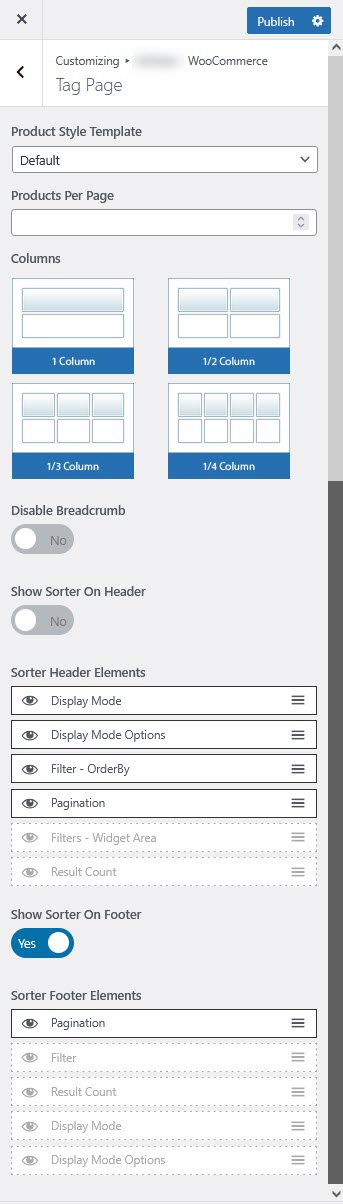
# Tag Page Settings
The **Tag Page Settings** allow customization of the product display, sorting options, pagination, and layout for better product organization based on tags.
{% hint style="success" %}
* Log in to your **WordPress Dashboard**.
* Navigate to **Appearance** > **Customize**.
* Click on **Theme WooCommerce** > **Tag Page**.
{% endhint %}
### **Configurable Options**
**Product Display Settings**
* **Product Style Template:** Select a predefined product style (**Product-Style\_1**).
* **Products Per Page:** Set the number of products displayed per page (**Default: 9**).
* **Columns:** Define the number of columns for product display.
**Breadcrumb & Sorting Options**
* **Disable Breadcrumb:** Toggle ON to hide breadcrumbs on the tag page.
* **Show Sorter On Header:** Display sorting options at the top of the tag page.
**Sorter Header Elements**
* **Filter - OrderBy:** Allows sorting products by popularity, rating, price, or latest.
* **Filters - Widget Area:** Enables filter widgets in the sidebar.
* **Result Count:** Displays the number of products found in the current view.
* **Pagination:** Enables navigation between pages of products.
* **Display Mode:** Choose how products are displayed (e.g., Grid or List view).
* **Display Mode Options:** Provides layout customization options.
**Sorter Footer Elements**
* **Show Sorter On Footer:** Displays sorting options at the bottom of the tag page.
* **Pagination:** Enables pagination controls in the footer.
* **Filter:** Adds product filtering in the footer.
* **Result Count:** Shows the number of results at the bottom.
* **Display Mode:** Choose between grid and list views.
* **Display Mode Options:** Adjusts display settings.
**Saving and Applying Changes**
1. Adjust the settings as needed.
2. Click **Publish** in the Customizer to save changes.
3. Visit a **Tag Page** to verify the updated layout and features.
**Additional Customization**
* Use **CSS styling** for visual modifications.
* Install plugins like **WooCommerce Product Filter** for advanced filtering.
* Modify **WooCommerce template files** for deeper customization.