# Blog Settings
The **Blog Settings** in a WordPress theme control the appearance and functionality of the blog section of your site. These settings typically allow you to customize how blog posts are displayed, including layouts, styles, and metadata.
{% hint style="success" %}
Here's a short form of the **Blog Settings** settings process in WordPress:
**Step 1 : Login** to your WordPress admin dashboard.
**Step 2 :** Go to **Appearance** > **Customize**.
**Step 3 :** **Blog Settings** in the Customizer panel.
**Step 4 :** Adjust the settings as desired.
**Step 5:** Click **Publish** to save your changes.
{% endhint %}
#### **Customizing Blog Archives Settings**
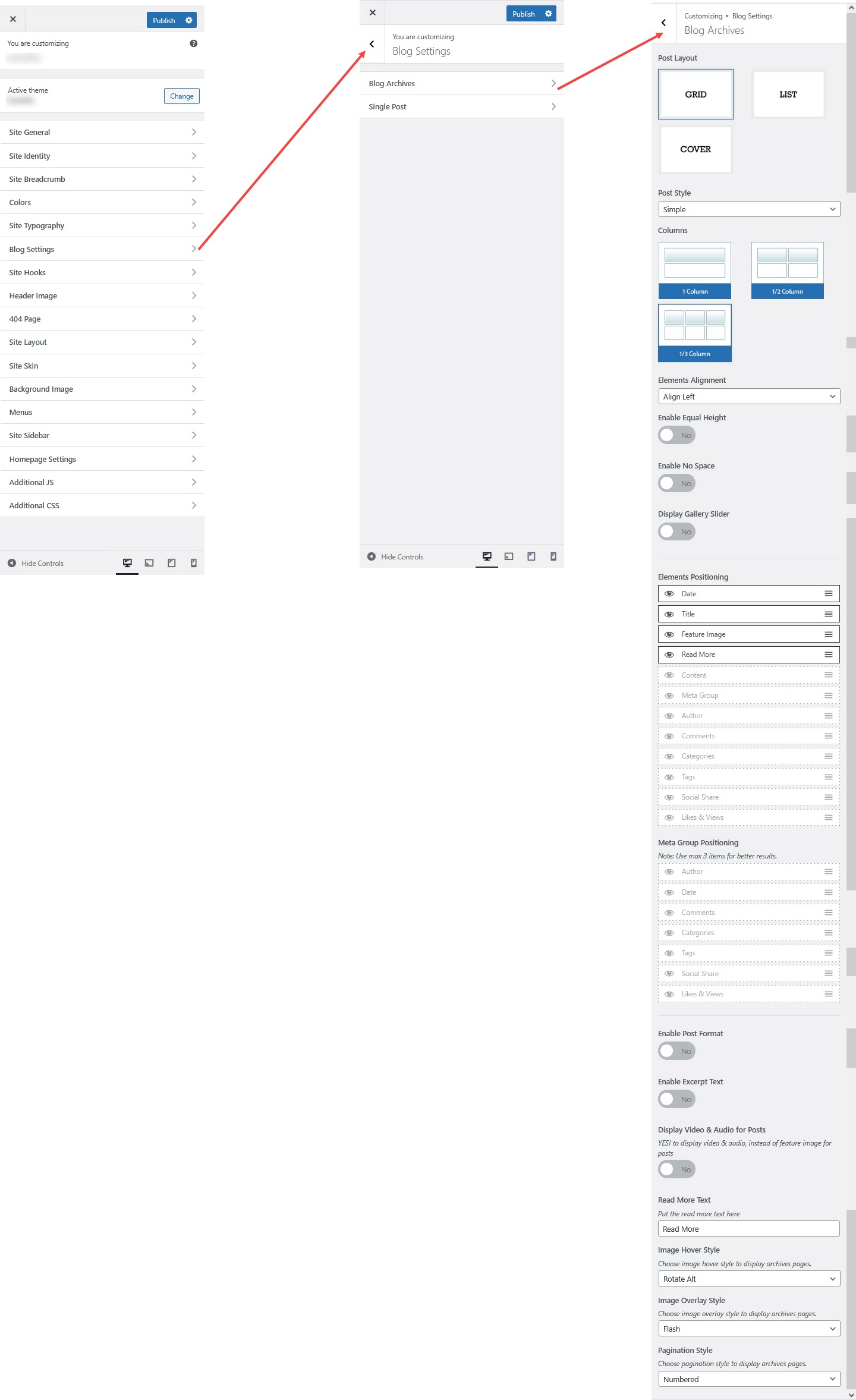
Under **Appearance → Customize → Blog Settings → Blog Archives**, you can adjust the layout and styling of your blog archive pages.
#### Post Layout
* **Post Style**: Choose between *Simple* or *Columns* for displaying posts.
* **Elements Alignment**: Align posts to the *Left*, *Right*, or *Center*. You can also enable or disable options such as **Equal Height** and **No Space** based on your layout preferences.
* **Display Gallery Slider**: Enable a slider for posts that contain multiple images.
#### Elements Positioning
Select which elements appear in post previews:
✔ Date\
✔ Title\
✔ Feature Image\
✔ Read More Button\
✔ Content\
✔ Meta Group *(Author, Comments, Categories, Tags, Social Share, Likes & Views)*
#### Meta Group Positioning
Choose up to **3 meta items** (e.g., *Author, Date, Comments, Categories*) for better clarity and layout balance.
#### Additional Post Settings
* **Enable Excerpt Text**: Show a summary of the post instead of the full content.
* **Display Video & Audio for Posts**: Show video/audio instead of a featured image when available.
#### Read More Button
Customize the **Read More** text for posts.
#### Image Effects
* **Image Hover Style**: Choose effects such as *Rotate Alt*.
* **Image Overlay Style**: Apply overlays like *Flash* for visual enhancement.
#### Pagination Style
Select your preferred pagination style: *Numbered* or any other available option.
#### Saving Your Changes
Click **Publish** to apply the updates.
***
### Customizing Single Post Settings
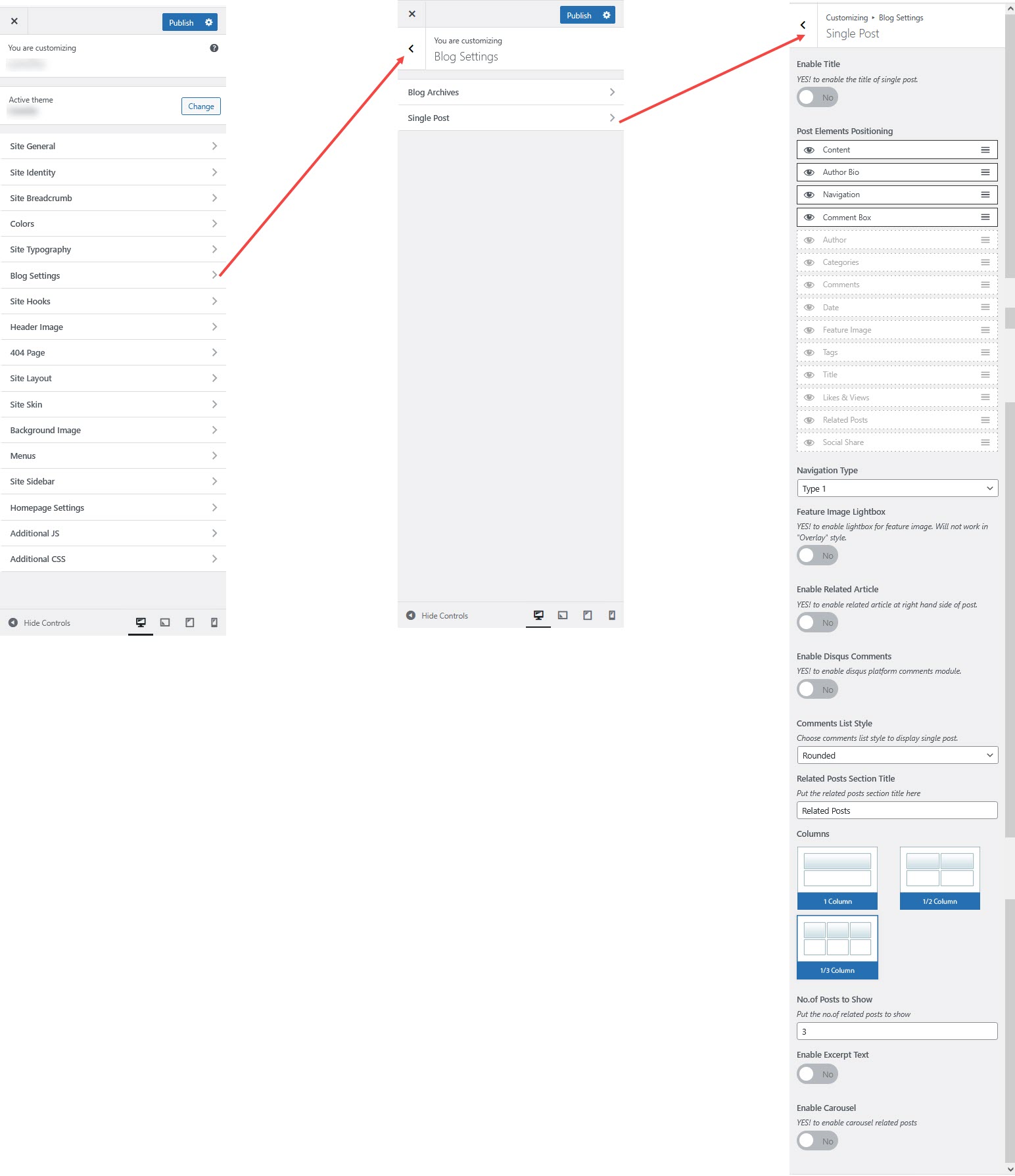
Navigate to **Appearance → Customize → Blog Settings → Single Post** to personalize the appearance of individual blog posts.
**1. Enable Title**
* ✅ **YES!** to display the **post title** on single post pages.
#### 2. Post Elements Positioning
Rearrange or enable/disable the following elements:
✔ **Content**
✔ **Author Bio**
✔ **Navigation**
✔ **Comment Box**
✔ **Author**
✔ **Categories**
✔ **Comments**
✔ **Date**
✔ **Feature Image**
✔ **Tags**
✔ **Title**
✔ **Likes & Views**
✔ **Related Posts**
✔ **Social Share**
**3. Navigation Type**
* Select **Type 1** (other styles may be available).
**4. Feature Image Settings**
* **Enable Feature Image Lightbox** ✅ (Only works if "Overlay" style is disabled).
**5. Related Articles**
* **Enable Related Articles** ✅ (Displays related posts on the right side).
**6. Comments Settings**
* **Enable / Di**s**able** **Comments** ✅ (Activates Disqus for discussions).
* **Comments List Style**: Choose **Rounded** or other available styles.
**7. Related Posts Settings**
* **Related Posts Section Title**: Customize the heading (e.g., *Related Posts*).
* **Columns**: Define the layout.
* **Number of Posts to Show**: Default is **3**.
* **Enable Excerpt Text** ✅ (Shows a short summary).
* **Enable Carousel** ✅ (Displays related posts in a slider).
**Saving Your Changes**
* Click **Publish** to apply updates.