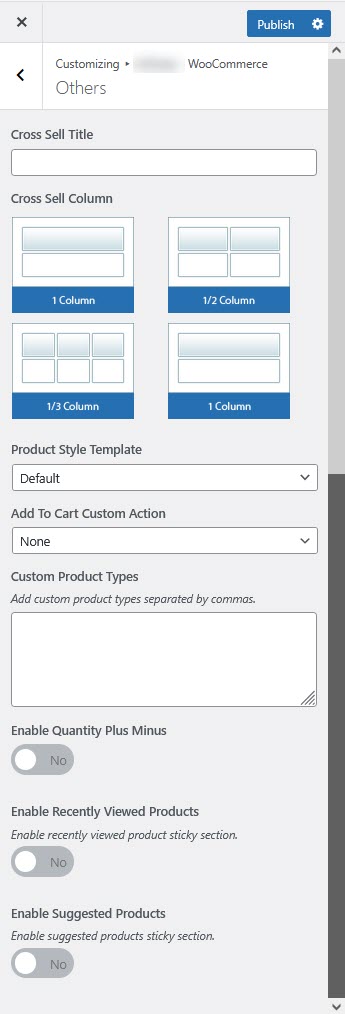
# Other Settings
The **Other Settings** section in WooCommerce provides additional customization options such as cross-sell display, custom product types, quantity controls, and recently viewed products.
{% hint style="success" %}
* Log in to your **WordPress Dashboard**.
* Navigate to **Appearance** > **Customize**.
* Click on Theme **WooCommerce** > **Others**.
{% endhint %}
#### **Configurable Options**
**Cross-Sell Settings**
* **Cross Sell Title:** Set a custom title for cross-sell product recommendations.
* **Cross Sell Column:** Define the number of columns to display cross-sell products.
**Product Display Options**
* **Product Style Template:** Select a predefined product style (**Product-Style\_1**).
* **Add To Cart Custom Action:** Choose how the "Add to Cart" action behaves (e.g., **Notification Widget**).
**Custom Product Types**
* **Custom Product Types:** Add custom product types separated by commas for specialized products.
**Quantity Controls**
* **Enable Quantity Plus Minus:** Enable **+/-** buttons for adjusting product quantity on single product and cart pages.
**Recently Viewed Products**
* **Enable Recently Viewed Products:** Toggle ON to track and display recently viewed products.
* **Enable Recently Viewed Product Sticky Section:** Display a floating section showing recently viewed products.
**Suggested Products**
* **Enable Suggested Products:** Toggle ON to suggest related products to users.
* **Enable Suggested Products Sticky Section:** Display a sticky section with suggested products based on browsing behavior.
**Saving and Applying Changes**
1. Adjust the settings as needed.
2. Click **Publish** in the Customizer to save changes.
3. Visit the **Shop and Product Pages** to verify the updates.
**Additional Customization**
* Use **CSS styling** for design adjustments.
* Use **WooCommerce extensions** for advanced product suggestions and cross-sell features.
* Modify **WooCommerce template files** to customize the recently viewed or suggested products section.